NoteV1
Download

The AI notepad for client meetings.

Made for advisors, sales professionals, recruiters, and consultants.

Notes you'll actually keep.

Every meeting becomes a clean set of notes: a summary, the decisions, and the action items. Templates match the kind of call, from a sales call to a client review, a 1:1, or an interview.

Private by default.

Transcription and notes run on your computer. Your recordings, transcripts, and notes stay on your device.

No bot in the room.

NoteV1 doesn't join your call or show up in the participant list. It just listens to your computer, so it works on Zoom, Teams, Meet, a phone call, or in person.
Every meeting, written up for you.

NoteV1 runs in the background while you talk. When the call ends, your notes are ready — summary, decisions, and follow-ups.

Coming up

15

Jun

Henderson — quarterly review

Now · 10:00 – 10:30

Start now

16

Jun

Candidate screen — Alex M.

14:00 – 14:30

Yesterday

Discovery call — Brightside Co.

Me

2:29 PM

Portfolio review — R. Diaz

Me

11:21 AM

1:1 with Priya

Me

9:14 AM

Every meeting, planned or not.

Sync your calendar so scheduled calls are ready to record, or start a recording for any ad-hoc conversation on the spot.

Discovery call — Brightside Co.

Fri, Jun 12
3

Notes

Summary

Reviewed Q2 performance and set the plan for the next two quarters.

Key points

On track to the 2030 goal, ahead on the savings rate

Wants to revisit the college fund in the fall

Action items

Send the updated projection by Friday

Schedule the estate-planning intro

Transcript

ClientHow are we tracking against the 2030 number?
YouAhead, actually — your savings rate got us there.
ClientGood. Can we look at the college fund next time?

Structured notes, instantly.

NoteV1 turns the conversation into a clean summary with key points, decisions, and follow-ups, in a format that fits the meeting.

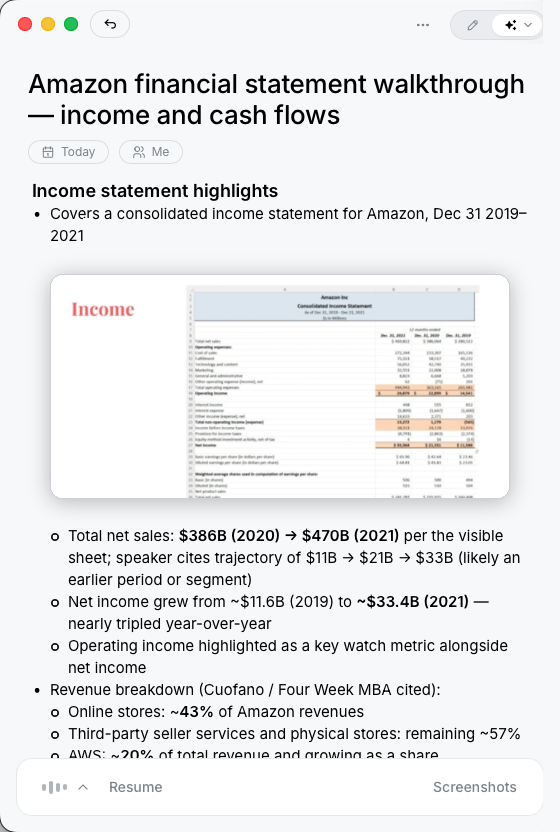
NoteV1 keeping the documents shared on screen alongside the notes

NoteV1 keeping the documents shared on screen alongside the notes

It remembers what was on screen, too.

NoteV1 captures whatever appears on screen, like slides or shared documents, and keeps it with your notes. The write-up reflects what you saw, not just what was said.

How NoteV1 works.

Three steps. You only do the first.

01

Hit record.

Open NoteV1 and start the meeting, in person or on any call. It reads your calendar, so the right one's already at the top.

02

Have the conversation.

NoteV1 listens in the background and transcribes on your computer.

03

Walk away with the notes.

When you're done, the notes are written: summary, decisions, and follow-ups, in a template that fits the meeting.

Common questions.

Answers to the questions we hear most.

From Coniferous

NoteV1 is built with Spruce.

A native desktop app for planning, code, and review. Every feature, bug, and task lives in your repo as plain markdown.
Try Spruce

Coniferous also makes Tamarack ↗, a DSL-powered image annotation tool.

Never take meeting notes again.